Latest
Home / Player Hub / Guides / Hardware
The short version
- Bypass charging takes battery charging out of the gaming workload. The processor and screen still produce heat.
- Samsung needs a 25W-or-higher USB PD charger with PPS, a battery above 20% and a game running.
- ASUS calls it Bypass charging, REDMAGIC calls it Charge Separation and Sony calls it H.S. power control.
- Pixel's 80% limit, iPhone's Charge Limit and controller passthrough are different features from a gaming bypass.
A phone running a demanding game while it charges is doing two jobs at once: running the game and filling its battery. Bypass charging splits those apart. On compatible phones, the charger powers the phone directly and battery charging pauses, so you can play plugged in for hours without the battery cycling the whole time.
Frame rate is a separate matter. If the game or the cooling system is already holding the processor back, switching charging modes will not necessarily lift FPS. The main gain is a long plugged-in session that leaves the battery alone.
Bypass charging and charge limits are different features
| Feature | What it changes | What to verify |
|---|---|---|
| Standard charging | Runs the phone and charges the battery at the same time | The default when no gaming mode is on. |
| Gaming bypass | Pauses battery charging while external power runs the device | Charger, battery level and game-mode prerequisites. |
| Charging limit | Caps the battery's usual maximum charge | Whether the manufacturer also documents a separate bypass function. |
| Controller passthrough | Lets a controller accept power and pass it to the phone | Whether the phone still receives the charging protocol it needs. |
A USB-C controller that advertises passthrough charging is not automatically compatible with a phone's bypass mode, and a phone with a charge limit may have no gaming bypass at all.
Which phones support bypass charging?
The phones below are examples documented by their manufacturers. Support can vary by model, region and software, so check the setting on the exact variant before buying a phone for this feature.
| Phone family or example | Feature name | Where to look |
|---|---|---|
| Select Galaxy S24, S25, S26, Z Fold, Z Flip and A-series devices | Pause USB PD charging when gaming | Gaming Hub > More > Game Booster |
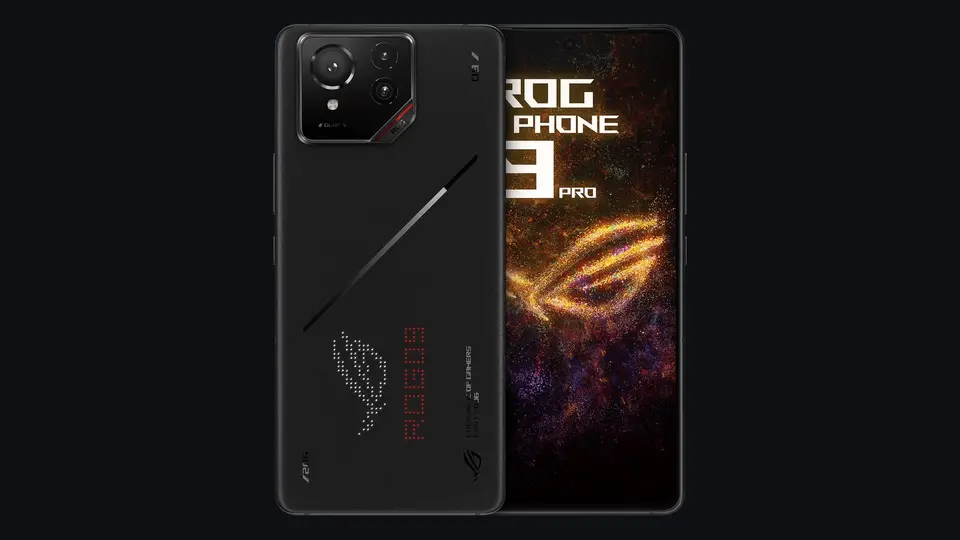
| ASUS ROG Phone 9 and ROG Phone 9 Pro | Bypass charging | Game Genie > Charging Mode in Game |
| REDMAGIC 11S Pro | Charge Separation | Settings > Battery, or Game Space charging settings on the 11S Pro |
| Sony Xperia 1 VIII and Xperia 1 VII | H.S. power control | Game enhancer > Game mode |
Samsung's support pages say the feature is on select models within these Galaxy families. ASUS documents its Game Genie option, REDMAGIC describes Charge Separation for its gaming phones and Sony documents H.S. power control for Xperia. If the toggle is missing on your phone, look up that specific model before spending money on accessories.
Enable Pause USB PD charging on a Samsung Galaxy
- Connect a USB Power Delivery charger that supports Programmable Power Supply (PPS) and is rated at 25W or more.
- Make sure the battery is above 20%.
- Open Gaming Hub, tap More, then Game Booster.
- Turn on Pause USB PD charging when gaming and launch your game.
Samsung says to connect the PD charger before opening Gaming Hub. On One UI 6.0 or later, Game Booster shows whether your phone supports the feature without a charger attached. On older software, the option appears only after a PD charger has been connected once. The game also has to stay on screen: Samsung says the feature stops working if you turn the screen off or switch to another screen, even with the game still running.
If the control is greyed out, check the charger first. A high wattage figure says nothing about PPS support. Connect the charger straight to the phone, without a controller, dock or hub in between, and use an undamaged cable rated for that charger. If the option is still missing, check whether your model and software are on Samsung's list before buying a pricier charger.
Enable bypass charging on ROG, REDMAGIC and Xperia
On supported ROG phones, open the game, connect the charger to either USB-C port, swipe out Game Genie and tap Charging Mode in Game. Choose Bypass charging in-game. ASUS also offers Smart bypass in-game, which stops charging the battery automatically based on remaining power and usage, and Regular charging in-game, which charges the battery while you play. All three apply only while a game is running. Pick regular charging when you need to top up the battery before heading out.
REDMAGIC's guide puts Charge Separation in Settings > Battery. On the REDMAGIC 11S Pro, REDMAGIC also places it in Game Space under the charging settings. You can set a charging percentage: once the battery reaches it, the phone runs directly from the power source and the battery stays untouched. REDMAGIC says Charge Separation applies to wired charging only, so wireless charging on the 11S Pro charges the battery in the usual way.
Sony's version is H.S. power control (Heat Suppression power control). Sony says that when you game with a charging cable connected, it powers the phone's systems directly and the battery does not charge while it is on. Start the game through Game enhancer, tap the floating Game enhancer icon, open Game mode and switch H.S. power control on. Turn it off when you want the battery to charge.
Pixel and iPhone offer charge limits
Google's Pixel battery guide offers Limit to 80% under Charging optimization on Pixel 6a and later. With it on, the Pixel still charges to full every 10th cycle to keep its battery capacity readings accurate. Google presents it as a battery-health setting, which puts it in the charge-limit row of the table above.
iPhone 15 models and later have Charge Limit in Settings > Battery > Charging, adjustable from 80 to 100 percent in 5 percent steps. Apple says the iPhone charges to within a few points of the limit and stops, then resumes charging if the level drops more than 5 percent while connected. Apple presents Charge Limit as a battery-lifespan setting, so it also belongs in the charge-limit row.
Do you need a new charger?
Probably not. Start with the output details printed on the charger you already own. For Galaxy, check that it supports USB PD with PPS at 25W or more. A 65W or 100W label on its own does not tell you that. Samsung's threshold applies to Samsung phones, so don't carry it over to other brands.
If you play with a telescopic controller, check the charging mode with the phone connected directly, then again through the controller, keeping the charger, game and battery level the same. If the feature disappears only with the controller attached, look into that accessory's power compatibility. Treat the result as a home diagnostic. It does not certify the controller as compatible.
For long plugged-in sessions, use a supported bypass mode if your phone has one. For portable play, charge normally when you need to. If the phone still runs hot, our guide on how to stop your phone overheating while gaming covers frame rate caps, graphics settings and the warning signs that mean you should stop. Never try to defeat the phone's thermal protection.
Methodology: this is a research-based setup guide built on manufacturer documentation. MaxCrit did not test these phones, and the guide claims no measured temperature drop, battery-lifespan gain or FPS increase.
Sources
- Samsung UK: Pause USB PD charging when gaming ↗primary
- Samsung Gulf: Pause USB PD charging when gaming ↗supporting
- ASUS ROG: Charging Mode in Game ↗supporting
- ASUS ROG: ROG Phone 9 Pro specifications ↗supporting
- ASUS ROG: ROG Phone 9 specifications ↗supporting
- REDMAGIC: Charge Separation explained ↗supporting
- REDMAGIC: 5 REDMAGIC 11S Pro features to set up first ↗supporting
- Sony: What is Heat Suppression (HS) power control and how to use it? ↗supporting
- Sony: Xperia 1 VIII Help Guide, Using the menu (Game enhancer) ↗supporting
- Google Pixel: Get the most life from your phone battery ↗supporting
- Apple: About Charge Limit and Optimized Battery Charging on iPhone ↗supporting

That's the whole story. Want more? See the Player Hub